For a long time, embedded devices were just “stupid black boxes”, especially in domains like industrial control and automotive. To be fair, in their own time, these systems were impressive engineering feats. But compared to today’s connected and software-heavy platforms, they really were “stupid”: no networking, no remote access, and therefore not much to secure.
Fast forward to now, and the world looks completely different. Every tiny box, from industrial controllers to IoT gadgets, is connected to a network. That means they are reachable from the outside world, and they can become stepping stones in bigger attacks. Because of this, both regulations and customers now expect network-level protection.
A fireWall is simply a gate keeper. It decides which network traffic is allowed throughand and which traffic get blocked. in the language of security, firewalls belong to the category of preventing controls, they will reduce the attack surface before the attacker can even try something nasty.
Traditionally, Linux relied on separate tools for packet filtering: iptables for IPv4, ip6tables for IPv6, arptables for ARP, and ebtables for Ethernet bridging. While these tools were effective, each maintained its own rule set and kernel hooks, which made managing consistent firewall policies increasingly difficult. To address this fragmentation, nftables was introduced as a unified framework, offering a cleaner design and backward compatibility with legacy iptables rules.
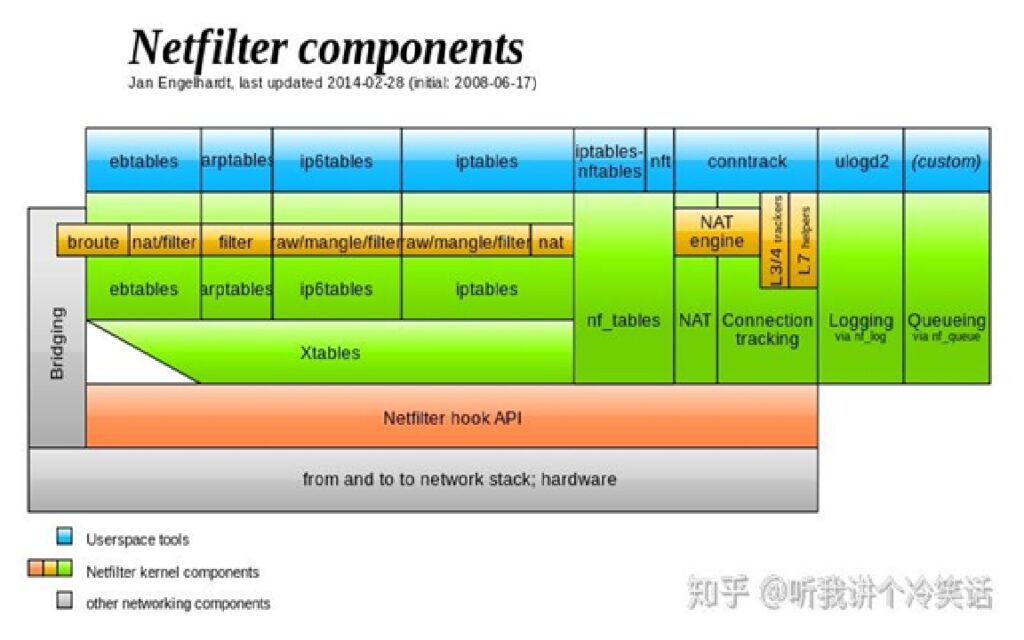
I came across the above diagram while browsing online, and it’s super helpful for getting a feel for the history and players in this space. “Netfilter components” diagram by Jan Engelhardt. In the image, you’ll see everything laid out—the old, messy firewall setup with iptables, nftables, and two other tools, conntrack and ulogd2. To make it easier to compare and understand, I messed around with the diagram a bit.
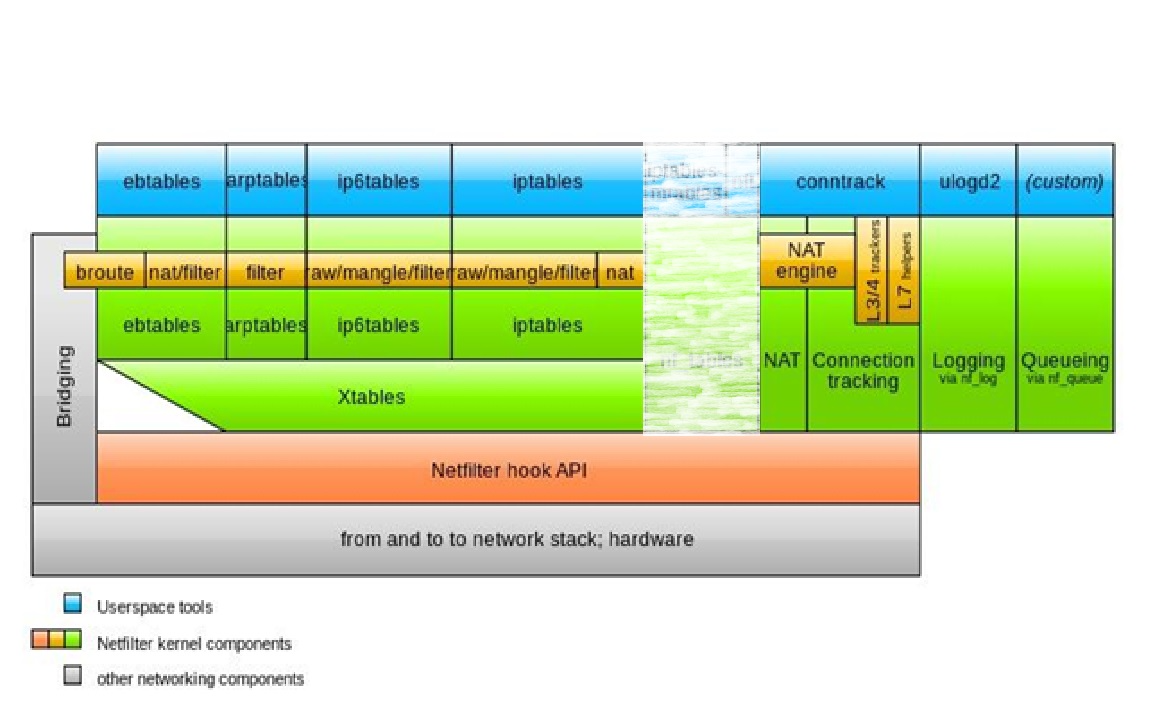)
If you have ever played with a Linux firewall, you have probably run into the mess of tools that exist. The old world looks like this :
- iptables for IPv4
- ip6tables for IPv6
- ARP tables for ARP packets (layer 2)
Under the hood, these tools interacted with the kernel through the xtables framework. The kernel exposed multiple tables—such as filter, nat, mangle, raw, and for bridging traffic, broute—and each protocol family needed its own tool to configure them. This fragmented setup added complexity when trying to maintain a consistent firewall policy. That’s what you see in the diagram above.

Then came nftables. Instead of four different tools, you now have just one: nft. This single tool just talk to the kernel subsystem nf_tables, which unifies all packet families (ipv4, ipv6, ARP, Bridge) under the same umbrella. It still hook into the same Netfilter framework in the kernel (PREROUTING, INPUT, FORWARD, OUTPUT, POSTROUTING), but the design is much cleaner and much easier to manage.
But there is a question about what Conntrack and ulogd2?
Conntrack and ulogd2: companions, not replacements
nftables by itself can filter packets just fine. But two other pieces often show up beside it as you can see in blow diagram:
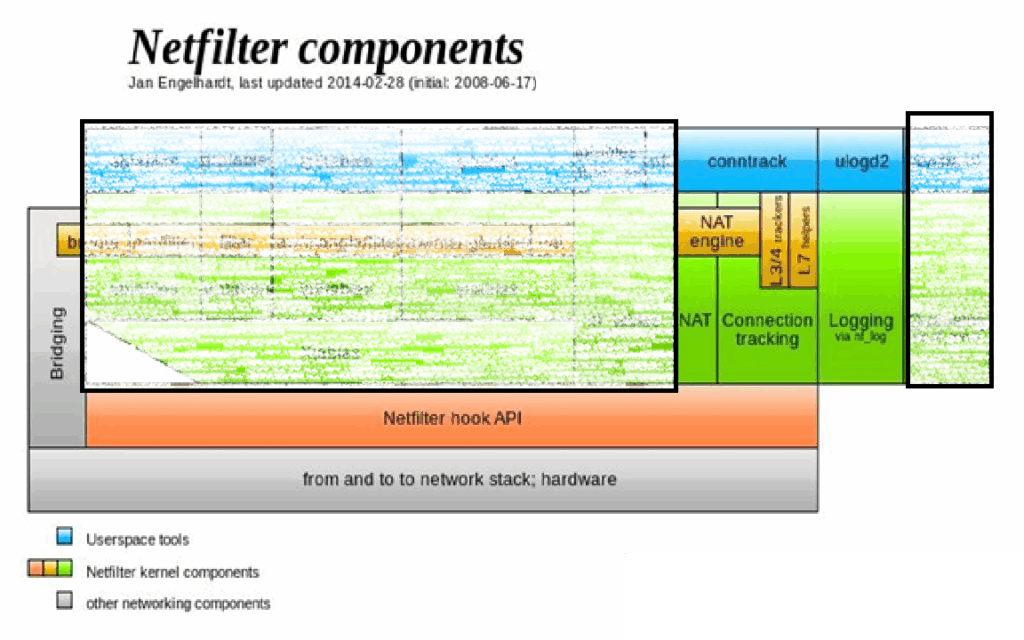
- Conntrack (Connection Tracking) :
This is a kernel subsystem (nf_conntrack) that keeps track of the state of connections. Without it, the firewall is stateless — every packet is judged in isolation. With it, you can write stateful rules such as:ct state established,related accept ct state invalid dropBoth iptables and nftables rely on conntrack, but it exists as its own kernel feature. You can even inspect its table directly with theconntrack-toolspackage. - ulogd2 :
This is a user-space daemon that receives packets passed through NFLOG and logs them to different backends — syslog, plain text files, or even databases like PostgreSQL. That flexibility makes it valuable for monitoring, analysis, and forensics. The trade-off is performance: logging too much traffic can quickly become a bottleneck, so it’s best used selectively.
In short: nftables is the core firewall engine, while conntrack and ulogd2 are companions that add state and visibility.
Ok, let’s change the topic and focus on nftables. At the heart of nftables lies the idea of packet filtering. Instead of trying to inspect the contents of applications, nftables looks at the headers of packets: source and destination addresses, protocol types, port numbers, and connection states. This is a proven approach that balances speed with sufficient control for most embedded use cases. On top of that, nftables offers a cleaner syntax, better performance when changing rules, and unified handling of both IPv4 and IPv6 traffic. All of these make it a natural choice for modern embedded Linux devices.
Of course, nftables doesn’t just appear by magic — a few key kernel features have to be switched on. These aren’t optional extras; they’re the foundation the firewall stack is built on. If you look at the architecture diagram, you can even map each of these options to the boxes in the picture.
At the base is CONFIG_NETFILTER, which enables the Netfilter framework itself. This is what creates the hooks — PREROUTING, INPUT, FORWARD, OUTPUT, POSTROUTING — where packets first meet the firewall. Without this, there is no filtering at all.
Next comes CONFIG_NF_TABLES, the nftables engine shown as the yellow box in the diagram. This is the rule processor that the nft command talks to over Netlink whenever you load or modify a ruleset.
If you want stateful filtering — the ability to remember which packets belong to established TCP/UDP connections — you’ll also need CONFIG_NF_CONNTRACK. It’s not drawn as a separate box, but you can think of it as the firewall’s memory, keeping track of every flow.
To make that connection state usable in rules, there’s CONFIG_NFT_CT. This bridges conntrack with nftables, which is why you can write rules like:
ct state established,related accept
ct state invalid drop
Without NFT_CT, the rule engine would never see connection states.
Finally, CONFIG_NFT_COUNTER adds counters to rules and chains. This lives inside the nftables subsystem and gives you visibility — how many packets matched a rule, how many bytes passed through. It’s a simple but powerful tool for monitoring and debugging.
So, piece by piece:
- CONFIG_NETFILTER – enables the kernel hooks where packets enter filtering.
- CONFIG_NF_TABLES – provides the nftables rule engine.
- CONFIG_NF_CONNTRACK – tracks the state of every connection.
- CONFIG_NFT_CT – exposes that state to your rules (
ct state). - CONFIG_NFT_COUNTER – lets you measure what’s happening with counters.
Together, these kernel options form the minimal plumbing you need to run nftables effectively. They turn the Linux kernel into a packet-filtering engine that is fast, flexible, and efficient enough for embedded devices.
To see this in action, consider a very simple scenario. Imagine you want to secure a device so that all inbound traffic is dropped by default, but SSH is still allowed for administration, ping requests are limited to prevent abuse, and outbound traffic is left unrestricted. With nftables, that setup can be expressed in just a few lines inside /etc/nftables.conf:
flush ruleset

table inet firewall {

  chain inbound {

    type filter hook input priority 0; policy drop;

    iif lo accept

    ct state vmap { established : accept, related : accept, invalid : drop }

    tcp dport 22 accept

    icmp type echo-request limit rate 5/second accept

  }

  chain forward {

    type filter hook forward priority 0; policy drop;

  }

  chain output {

    type filter hook output priority 0; policy accept;

  }

}
This is the beauty of nftables: a lean and modern firewall that can protect an embedded Linux system without requiring complex configuration or heavyweight software.
In this post, I’ve looked at the concepts:
What a firewall is, why it has become so important in embedded systems, how nftables fits into the picture, and which kernel modules make it possible.
In the next part, I’ll move from concepts to practice. We’ll explore how to enable these kernel options in Yocto, package nftables into an image, and make sure our firewall comes alive automatically on boot.
References: